Graphs Showing Performance Before After Event

Part of 320+ Visual PowerPoint Graphs Pack

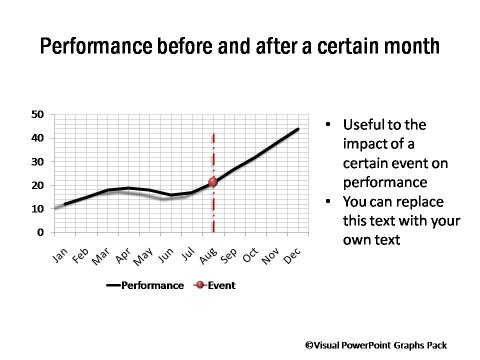
Performance Before and After an Event

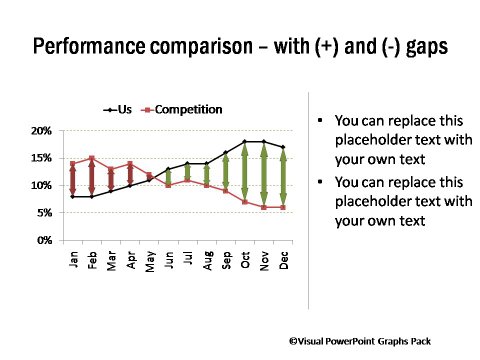
Performance Data Comparison related to an Event

The chart helps you explain any significant changes in trend by indicating the events that caused it.The event could be a new brand introduction, change in distribution systems, new advertisement roll out, discount offer period or any other. You can configure multiple events as well in the PowerPoint worksheet.


Highlighting an Event Period
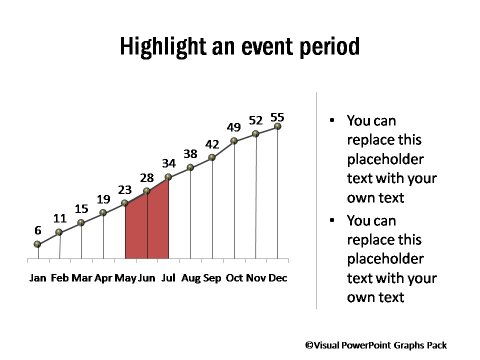
 Highlighting an Event Period

Performance with Post Event period Highlighted
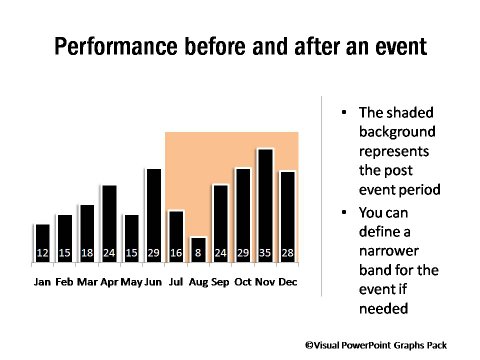
 Performance with Post Event period Highlighted

RELATED GRAPHS:

Performance Compared To TargetPerformance Across Products 

performance Compared to TargetPerformance Across Products

NEXT STEPS:

Go to Gallery of Visual PowerPoint PackView Demo of Visual Graphs PackPricing of Graphs Pack

Visual Graphs Pack Home  | Features  | License Terms

Widest Variety of Data-Driven Graphs & Infographics for PowerPoint

Who Can Use this Pack?

  • Business Managers
  • CEOs  / CXOs
  • Partners / VPs
  • Sales Marketing Managers
  • Manufacturing heads
  • Department heads
  • Team Managers
  • Executives & more...

Key Features

  - Huge Variety of 320+ Graphs

  - Easy to Use & Edit

  - Completely Data-Driven

  - No Additional Software

  - Get New insights from data

Created by Experts
in both Business Presentations &  PowerPoint Design
awards won by Ram
Awards at work & Presentation Category Winner on Slideshare 2010

Easy to Edit Pptx Files

PowerPoint Logo

Virus Scanned(E-Scan)

Protection

PayPal Verified Seller

Paypal Verified

30-Days Risk Free

Risk Free Guarantee


Browse All Graphs
in this Pack


Download Graph Samples

Get Brochure PDF

Contact Us