
From Text Based Slides to Powerful Diagrams in 3 easy steps.
Most business presentations don’t make it beyond the first 2 minutes.
It is not that the audiences are inattentive and busy. They just don’t engage with complex and boring slides anymore.
So, how can you hold your audience attention? How can you create presentations that move your audience into action?
The solution is to make Presentations Visual.
It is proven that your audience understands better and retains your message longer when information is presented as visuals.
In this practical eBook, Visual Presentations, we show you how to penetrate even the toughest minds with clear and effective diagrams. This is not a ‘tips and tricks’ book but a book that teaches you a system to convey your ideas powerfully using visuals – the right way.
Learn to create visual slides right away

Get Visual Presentations eBook Now
Format: Adobe PDF File
File Size: 8 MB Print Length: 105 pages
Price : $24 $12

Immediate Download | 30 Day Money Back Guarantee
Where can you use Visual Presentations?
If you make a presentation, it deserves to be visual. You can use them…
- To explain a complex strategy to top management
- To persuade your clients to give you more business
- To train your team on a new product
- To get investors to buy your dream
- To make any presentation where you want your message to be understood and remembered.
| Right Click and Save As…to download the first 5 chapters of this ebook FREE. Evaluate the quality of the eBook yourself. |  |
The eBook provides a practical and simple system…
The book teaches a system that you can use. The system involved 3 simple steps in translating bullet point slides into visual diagrams:
- Identify the objects and their relationships in the text-based slides
- Capture the relationship between the objects
- Visualize the objects
When you work through some of the examples provided, you’ll see how easy it is to run through these 3 steps. Here is an example from the book on making over a business concept.
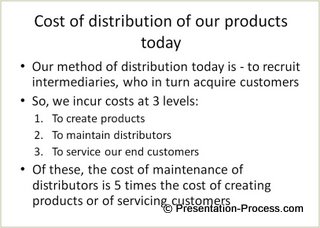
The original text-filled slide looks like this:
The final slide after following the 3 steps looks like this:
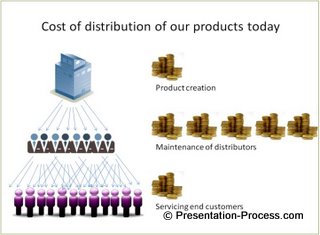
You can see the difference that the simple 3-step process makes to the impact with which you deliver you presentation! Download Visual presentations ebook now…
3 Reasons Why You Should Make Your Presentations Visual:
Which of these 2 slides hold your attention?
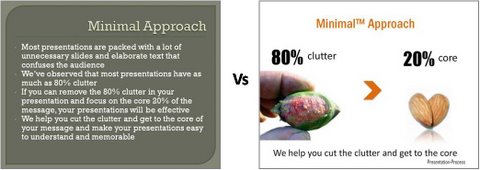
I am sure you selected the slide on the right. That answers why you need to use visual diagrams.
Reason 1: Visual presentations hold your audience attention far better than any other method.
Let’s see another case…
Which of the two slides shown below helps you understand the core message quickly and easily?
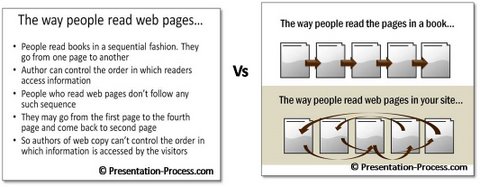
The slide on the right again! That gives you another reason why you should use visual diagrams.
Reason 2: Visual diagrams help audience understand your core message quickly and easily.
Let’s see another case. Which of the following two slides visualize the message of the slide better?

The slide on the left is nothing more than a picture to fill the space. The slide on the right uses a diagram to bring life to the message.
Reason 3: Good visual diagrams take your presentations to a whole new level and influence your business audience into making decisions in your favor.
As you can see, visual diagrams are a powerful tool to create business presentations that get results.
Make your slides easy to understand and engaging for your audience. Download Visual presentations ebook now…
About the Author
 | The author M.S.Ramgopal owns and operates Presentation Process.He has trained 100s of middle and senior managers from companies like Barclays, HSBC, Times Internet Ltd, and Tata-AIG through his presentation skills workshops. His entry was a category winner of Slideshare Presentation Contest in 2010 and he is a Platinum Level author on EzineArticles. |
Each of the principles taught in the book is backed by numerous scientific studies in the field of neuroscience and communication. The proprietary 3-step process you’ll learn in this book is the same content we teach our participants in our exclusive workshops.
The book is filled with examples and exercises to make you understand every bit of the process in clear detail.
eBook Table of Contents
| About Visual Presentations | 2 |
| License information | 4 |
| 1. Introduction | 9 |
| 2. Why use a diagram? | 13 |
| 3. Science behind the power of visuals | 17 |
| 4. Ineffective way of using visuals | 19 |
| 5. Creating diagrams | 22 |
| 6 The basic principle behind creating Visual diagrams | 25 |
| 7. Exercises: Identifying Objects and Relationships in a sentence | 28 |
| 8. The 3 step process to create visual diagrams from bullet points | 31 |
| 9. Convey a business concept as visual diagram | 37 |
| 10. Unique Selling Proposition as a diagram | 45 |
| 11. Strategic management concept as a visual diagram | 50 |
| 12. Anatomy of a visual diagram | 54 |
| 13.Quiz on the 7 critical relationship questions: | 60 |
| 14. Representing sales pitch as a business diagram | 63 |
| 15. Good diagrams can cut down your text | 68 |
| 16. Moving to the creative side of visual representation | 72 |
| 17. Making remarkable presentations using comparison | 77 |
| 18.Examples for depicting a relationship using comparisons | 80 |
| 19. Practice exercises for representing relationships | 84 |
| 20. Essential tips for data presentation | 88 |
| 21. Don’t visualize the wrong thing | 92 |
| 22. Fastest way to create remarkable Diagrams | 96 |
| Author’s Note | 104 |
Get the Visual Presentation Book and be sure about your presentations forever.
 | Buy today and enjoy it Risk Free with our 30-day Money Back Guarantee. If you don’t find value in the book, you can contact us through this website and we will give you your money back. |
Get Your copy of Visual Presentations now and change the way you present…
Format: Adobe PDF
File Size:8 MB
Print Length:105 pages
Usage License:Single User, Personal License
Publisher:Presentation Process.com
Language:English
Instant download on purchase
30 Day Money Back Guarantee
Once your purchase is processed successfully, you will get the “Visual Presentations” eBook download link right away.
Have a question? Contact Us Here