
You’ll need to whitelist our email address to ensure you receive updates from us regarding the product you purchased or information you requested.
Follow these instructions for Gmail:
1. In your inbox, locate an email from: 
( ex: your welcome mail for the product you just purchased or newsletter you just subscribed.)
2. Drag this email to the “Primary” tab of your inbox
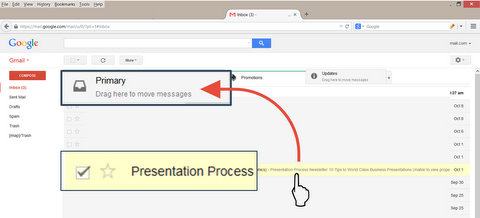
3. You’ll see that our emails will go to your primary folder in the future!
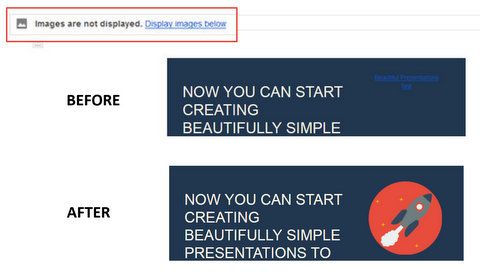
4. Next, Enable Display Images in the email. Presentations are a visual medium and we share images in our mail.
For other email providers
For other email service providers ( Yahoo, Hotmail, AOL, Corporate email account etc.) please add us as a contact in your address book.
Further instructions can be found here.