Box Plot and Candle Stick Chart

Part of : 320+ Visual PowerPoint Graphs Pack

Data-Driven Box Plot in PowerPoint

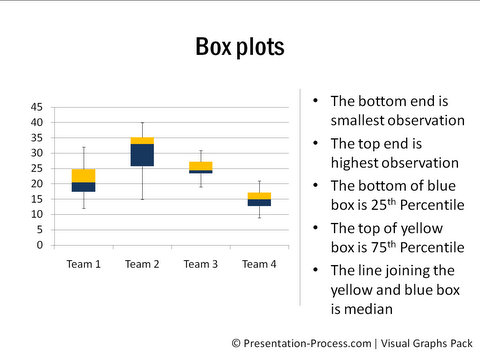
Box Plots

A box plot shows groups of data through their five number summaries. They are the smallest observation, lower quartile, median, upper quartile and highest observation. This is most often used to represent stock performance.

Though box chart is not a native chart of PowerPoint, the slide allows you to create the chart by just editing relevant numbers in the worksheet.


Box and Whisker Chart | Line Graph to Compare Stock Performance

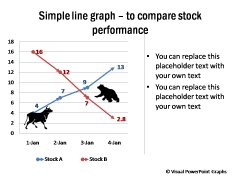
Box and Whisker Chart Simple Line Graph

High Low Close Chart | Chart with Volume
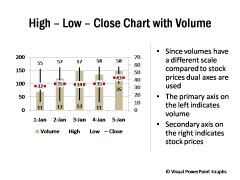
 High Low Close Chart High Low Close Chart with Volume


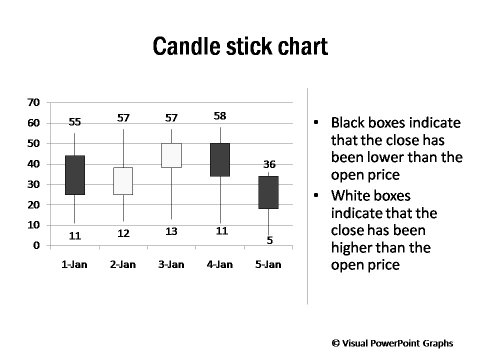
Candle Stick Chart

 Candle Stick Chart

Open High Low Close Chart with Volume

 High Low Close Chart with Volume

RELATED GRAPHS:


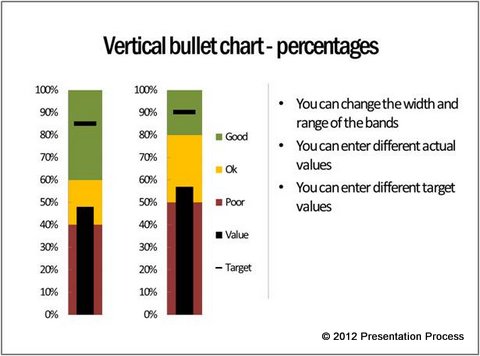
Bullet Charts      |   Gantt Charts

Bullet ChartGantt Charts

NEXT STEPS:

Go to Gallery of Visual PowerPoint PackView Demo of Visual Graphs PackPricing of Graphs Pack

Visual Graphs Pack Home  | Features  | License Terms

Widest Variety of Data-Driven Graphs & Infographics for PowerPoint

Who Can Use this Pack?

  • Business Managers
  • CEOs  / CXOs
  • Partners / VPs
  • Sales Marketing Managers
  • Manufacturing heads
  • Department heads
  • Team Managers
  • Executives & more...

Key Features

  - Huge Variety of 320+ Graphs

  - Easy to Use & Edit

  - Completely Data-Driven

  - No Additional Software

  - Get New insights from data

Created by Experts
in both Business Presentations &  PowerPoint Design
awards won by Ram
Awards at work & Presentation Category Winner on Slideshare 2010

Easy to Edit Pptx Files

PowerPoint Logo

Virus Scanned(E-Scan)

Protection

PayPal Verified Seller

Paypal Verified

30-Days Risk Free

Risk Free Guarantee


Browse All Graphs
in this Pack


Download Graph Samples

Get Brochure PDF

Contact Us